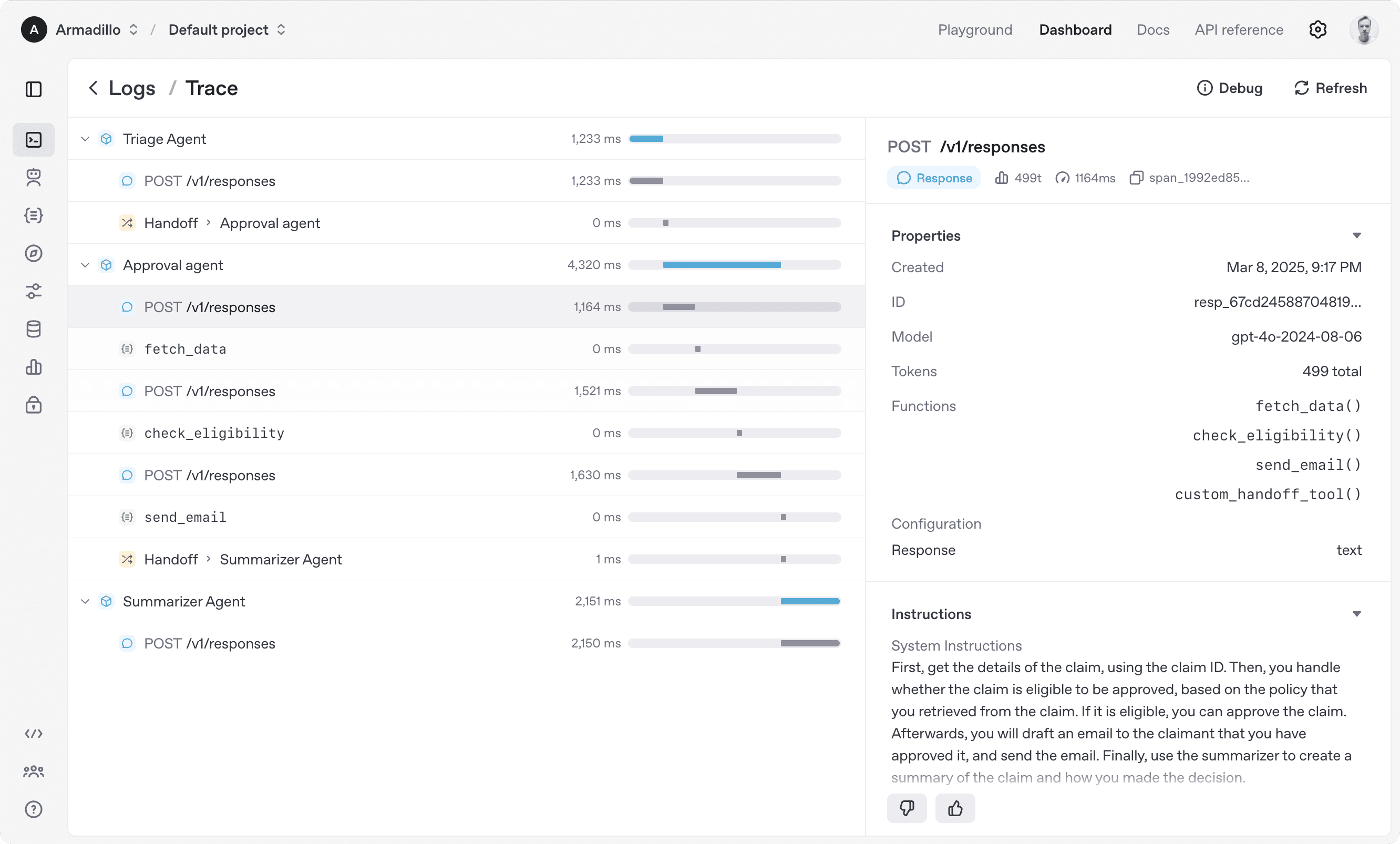
Demonstrates extremely low time-to-functional for OpenAI-committed teams. The lowest-friction path for linear handoff agents on OpenAI.
OpenAI Agents SDK
active17.5M PyPI downloads/month (may include bundled OpenAI SDK distribution), v0.12.4 (2026-03-18), 58 open issues vs 3,300 forks. Rowboat open-source multi-agent IDE built on this SDK — 161 HN pts. Best for linear handoff chains in pure OpenAI environments. Critical gaps: no state persistence, no MCP, pre-1.0 API.
71/100
Trust
20K+
Stars
3
Evidence
Product screenshot

Repo health
13h ago
Last push
70
Open issues
3,285
Forks
226
Contributors
Editorial verdict
Best for OpenAI-committed teams building linear handoff chains — lowest friction path if locked into OpenAI models. Pre-1.0 API, no state persistence, no MCP. Do not choose if you need model-agnosticism, state persistence, or a stable API.
Source
GitHub: openai/openai-agents-python
Docs: openai.github.io
Public evidence
Strong third-party ecosystem signal — an independent team chose this SDK as the foundation for a multi-agent IDE.
Temporal integration documented as the pattern for adding state persistence. Confirmed structural gap for stateful workflows.
How does this compare?
See side-by-side metrics against other skills in the same category.
Where it wins
17.5M PyPI downloads/month (nominally highest, likely includes bundled distribution)
Exceptionally low 58 open issues vs 3,300 forks — tight maintenance
Built-in tracing eliminates need for separate observability tooling
Rowboat ecosystem (161 HN pts, 51 comments) — strong third-party signal
'Under 100 lines for functional multi-agent system with guardrails and tracing' (particula.tech)
Where to be skeptical
Pre-1.0 (v0.x) — API still evolving, breaking changes possible
No native state persistence — must be built manually (Temporal integration required)
No native MCP support
OpenAI model lock-in — not model-agnostic
Ranking in categories
Know a better alternative?
Submit evidence and we'll run the full pipeline.
Similar skills
Claude Code
90Anthropic's official agentic coding CLI. Terminal-native, tool-use-driven, with deep file system and shell access. #1 SWE-bench Pro standardized (45.89%), ~4% of GitHub public commits (SemiAnalysis), $2.5B annualized revenue (fastest enterprise SaaS to $1B ARR). 8M+ npm weekly downloads. Opus 4.6 with 1M context.
OpenHands
88Category leader in multi-agent orchestration — 69,352 stars (verified), $18.8M Series A, AMD hardware partnership, 455 contributors, 1M downloads/month PyPI (3.4M all-time). SWE-Bench Verified 72% with Claude 4.5 Extended Thinking (updated 2026-03-19), Multi-SWE-Bench #1 across 8 languages. Gap to #2 is enormous on every axis.
n8n
83179,860 GitHub stars — largest OSS repo in adjacent workflow-automation space by 2×. 3,000+ enterprise customers, ~200,000 active users, $60M Series B. 1,100+ ready-to-use integrations, native AI Agent node, MCP client/server support. Best for orchestrating SaaS integrations and processes with AI nodes — not for building agent systems in code.
LangGraph
78#1 Python agent framework by production evidence — 40.2M PyPI downloads/month, Fortune 500 deployments (LinkedIn, Uber, Replit, Elastic, Klarna, Cloudflare, Coinbase), ~400 LangGraph Platform companies, LangSmith rated best-in-class observability. Stable v1.x API, model-agnostic, MCP support.
Raw GitHub source
GitHub README peek
Constrained peek so you can sanity-check the source material without leaving the site.
The OpenAI Agents SDK is a lightweight yet powerful framework for building multi-agent workflows. It is provider-agnostic, supporting the OpenAI Responses and Chat Completions APIs, as well as 100+ other LLMs.
<img src="https://cdn.openai.com/API/docs/images/orchestration.png" alt="Image of the Agents Tracing UI" style="max-height: 803px;">[!NOTE] Looking for the JavaScript/TypeScript version? Check out Agents SDK JS/TS.
Core concepts:
- Agents: LLMs configured with instructions, tools, guardrails, and handoffs
- Agents as tools / Handoffs: Delegating to other agents for specific tasks
- Tools: Various Tools let agents take actions (functions, MCP, hosted tools)
- Guardrails: Configurable safety checks for input and output validation
- Human in the loop: Built-in mechanisms for involving humans across agent runs
- Sessions: Automatic conversation history management across agent runs
- Tracing: Built-in tracking of agent runs, allowing you to view, debug and optimize your workflows
- Realtime Agents: Build powerful voice agents with full features
Explore the examples directory to see the SDK in action, and read our documentation for more details.
Get started
To get started, set up your Python environment (Python 3.10 or newer required), and then install OpenAI Agents SDK package.
venv
python -m venv .venv
source .venv/bin/activate # On Windows: .venv\Scripts\activate
pip install openai-agents
For voice support, install with the optional voice group: pip install 'openai-agents[voice]'. For Redis session support, install with the optional redis group: pip install 'openai-agents[redis]'.
uv
If you're familiar with uv, installing the package would be even easier:
uv init
uv add openai-agents
For voice support, install with the optional voice group: uv add 'openai-agents[voice]'. For Redis session support, install with the optional redis group: uv add 'openai-agents[redis]'.
Run your first agent
from agents import Agent, Runner
agent = Agent(name="Assistant", instructions="You are a helpful assistant")
result = Runner.run_sync(agent, "Write a haiku about recursion in programming.")
print(result.final_output)
# Code within the code,
# Functions calling themselves,
# Infinite loop's dance.
(If running this, ensure you set the OPENAI_API_KEY environment variable)
(For Jupyter notebook users, see hello_world_jupyter.ipynb)
Explore the examples directory to see the SDK in action, and read our documentation for more details.
Acknowledgements
We'd like to acknowledge the excellent work of the open-source community, especially:
- Pydantic (data validation) and PydanticAI (advanced agent framework)
- LiteLLM (unified interface for 100+ LLMs)
- MkDocs
- Griffe
- uv and ruff
We're committed to continuing to build the Agents SDK as an open source framework so others in the community can expand on our approach.