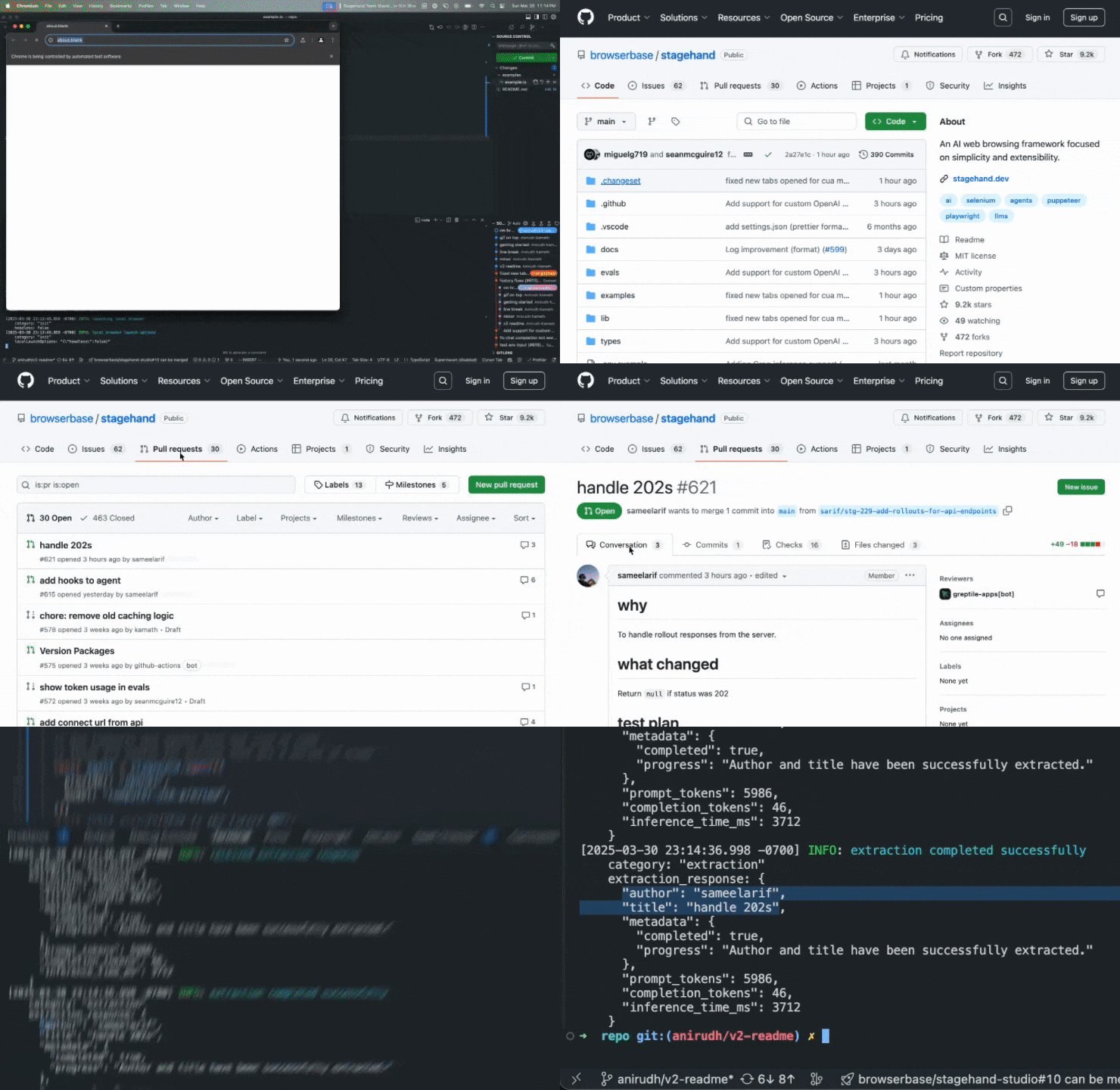
Constrained peek so you can sanity-check the source material without leaving the site.
<div id="toc" align="center" style="margin-bottom: 0;">
<ul style="list-style: none; margin: 0; padding: 0;">
<a href="https://stagehand.dev">
<picture>
<source media="(prefers-color-scheme: dark)" srcset="media/dark_logo.png" />
<img alt="Stagehand" src="https://raw.githubusercontent.com/browserbase/stagehand/main/media/light_logo.png" width="200" style="margin-right: 30px;" />
</picture>
</a>
</ul>
</div>
<p align="center">
<strong>The AI Browser Automation Framework</strong><br>
<a href="https://docs.stagehand.dev">Read the Docs</a>
</p>
<p align="center">
<a href="https://github.com/browserbase/stagehand/tree/main?tab=MIT-1-ov-file#MIT-1-ov-file">
<picture>
<source media="(prefers-color-scheme: dark)" srcset="media/dark_license.svg" />
<img alt="MIT License" src="https://raw.githubusercontent.com/browserbase/stagehand/main/media/light_license.svg" />
</picture>
</a>
<a href="https://stagehand.dev/discord">
<picture>
<source media="(prefers-color-scheme: dark)" srcset="media/dark_discord.svg" />
<img alt="Discord Community" src="https://raw.githubusercontent.com/browserbase/stagehand/main/media/light_discord.svg" />
</picture>
</a>
</p>
<p align="center">
<a href="https://trendshift.io/repositories/12122" target="_blank"><img src="https://trendshift.io/api/badge/repositories/12122" alt="browserbase%2Fstagehand | Trendshift" style="width: 250px; height: 55px;" width="250" height="55"/></a>
</p>
<p align="center">
<a href="https://deepwiki.com/browserbase/stagehand">
<img alt="Ask DeepWiki" src="https://deepwiki.com/badge.svg" />
</a>
</p>
<p align="center">
If you're looking for the Python implementation, you can find it
<a href="https://github.com/browserbase/stagehand-python"> here</a>
</p>
<div align="center" style="display: flex; align-items: center; justify-content: center; gap: 4px; margin-bottom: 0;">
<b>Vibe code</b>
<span style="font-size: 1.05em;"> Stagehand with </span>
<a href="https://director.ai" style="display: flex; align-items: center;">
<span>Director</span>
</a>
<span> </span>
<picture>
<img alt="Director" src="https://raw.githubusercontent.com/browserbase/stagehand/main/media/director_icon.svg" width="25" />
</picture>
</div>
What is Stagehand?
Stagehand is a browser automation framework used to control web browsers with natural language and code. By combining the power of AI with the precision of code, Stagehand makes web automation flexible, maintainable, and actually reliable.
Why Stagehand?
Most existing browser automation tools either require you to write low-level code in a framework like Selenium, Playwright, or Puppeteer, or use high-level agents that can be unpredictable in production. By letting developers choose what to write in code vs. natural language (and bridging the gap between the two) Stagehand is the natural choice for browser automations in production.
-
Choose when to write code vs. natural language: use AI when you want to navigate unfamiliar pages, and use code when you know exactly what you want to do.
-
Go from AI-driven to repeatable workflows: Stagehand lets you preview AI actions before running them, and also helps you easily cache repeatable actions to save time and tokens.
-
Write once, run forever: Stagehand's auto-caching combined with self-healing remembers previous actions, runs without LLM inference, and knows when to involve AI whenever the website changes and your automation breaks.
Getting Started
Start with Stagehand with one line of code, or check out our Quickstart Guide for more information:
npx create-browser-app
Example
Here's how to build a sample browser automation with Stagehand:
// Stagehand's CDP engine provides an optimized, low level interface to the browser built for automation
const page = stagehand.context.pages()[0];
await page.goto("https://github.com/browserbase");

// Use act() to execute individual actions
await stagehand.act("click on the stagehand repo");

// Use agent() for multi-step tasks
const agent = stagehand.agent();
await agent.execute("Get to the latest PR");

// Use extract() to get structured data from the page
const { author, title } = await stagehand.extract(
  "extract the author and title of the PR",
  z.object({
    author: z.string().describe("The username of the PR author"),
    title: z.string().describe("The title of the PR"),
  }),
);
Documentation
Visit docs.stagehand.dev to view the full documentation.
Build and Run from Source
git clone https://github.com/browserbase/stagehand.git
cd stagehand
pnpm install
pnpm run build
pnpm run example # run the blank script at ./examples/example.ts
Stagehand is best when you have an API key for an LLM provider and Browserbase credentials. To add these to your project, run:
cp .env.example .env
nano .env # Edit the .env file to add API keys
Installing from a branch
You can install and build Stagehand directly from a github branch using gitpkg
In your project's package.json set:
"@browserbasehq/stagehand": "https://gitpkg.now.sh/browserbase/stagehand/packages/core?<branchName>",
Contributing
[!NOTE]