skillpack.co
All solutions

Gemini CLI

active

Google's open-source terminal agent with Gemini 3 models, 1M token context, built-in Google Search grounding, and the best free tier in the category (60 req/min, 1K req/day). v0.35.0 (Mar 24) shipped keybinding, policy, and telemetry fixes while the repo hit 98,957 stars and 12,593 forks. Terminal-Bench 2.0: 78.4% (#1). SWE-bench Pro standardized 43.30% (#3). Plan Mode added March 2026. First-pass correctness ~50-60% (Educative.io).

Score 88trending
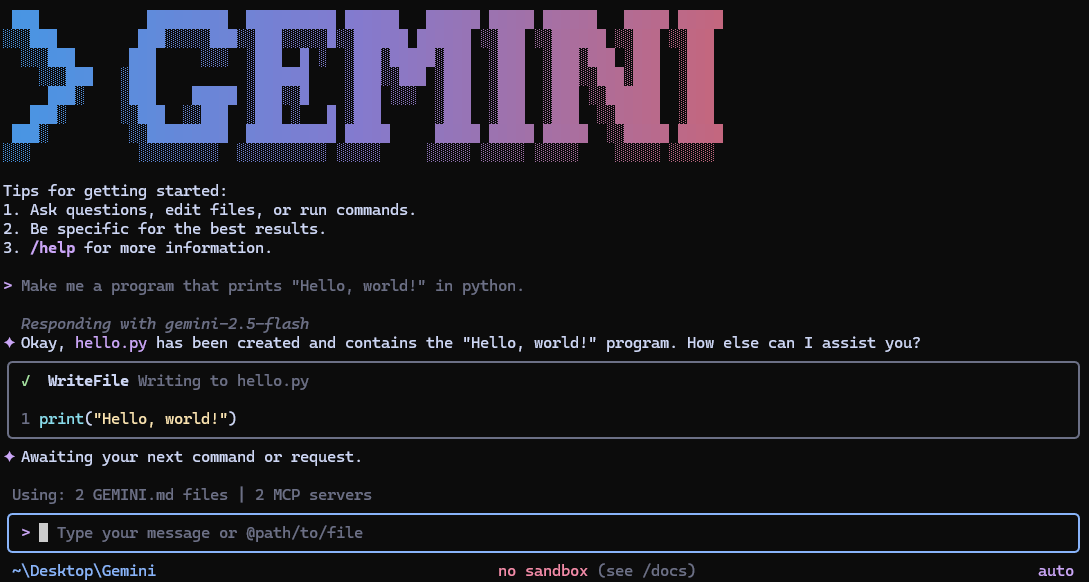
Gemini CLI in action

Shipped last month

Gemini CLI moves to #2 in coding-clis

Weekly v0.35.0 releases plus doc-verified 1M context / 1K free requests pushed Gemini ahead of Codex CLI in the coding-clis ranking. · 2026-03-25

ALL RELEASES →

Where it wins

98,380 stars (#1 by star count in coding agent category)

Best free tier: 1K req/day with personal Google account — unmatched in category

1M token native context window — largest in category

SWE-bench Verified 80.6% (Gemini 3.1 Pro) — near-parity with Claude Code

Terminal-Bench 2.0: 78.4% (#1) — highest terminal-native task score in category

SWE-bench Pro 43.3% (SEAL) — competitive, gap narrowing with each model release

709 commits/month — very active development

Plan Mode added March 11, 2026 — closes last major feature gap

Native Google Search grounding mid-task — unique among coding CLIs

Open source (Apache 2.0), 446 contributors, extensions system + full MCP client

Where to be skeptical

File deletion incident catalogued in AI Incident Database (#1178) — trust-damaging event

Free tier throttles to Flash model after 10-15 Pro prompts (community-reported)

HN consensus: 'Gemini is really bad with tool calling' (158 pts thread)

No published SWE-bench scores from Google themselves — 76.2% comes from independent testing

50-60% first-pass correctness (Educative.io) — roughly half of Claude Code's ~95%. Requires significantly more iteration

CLI scaffolding acknowledged as behind the model's capabilities, even by Gemini enthusiasts

Editorial verdict

#3 coding CLI — best free entry point and Terminal-Bench leader (78.4% #1). 1K req/day free tier is unmatched, 1M context is the largest. SWE-bench Pro standardized 43.30% is competitive. Plan Mode (March 2026) closes last major feature gap. File deletion incident (AI Incident Database #1178) and 50-60% first-pass correctness (roughly half of Claude Code) are real concerns.

How to get started

Run npx @google/gemini-cli or install globally with npm install -g @google/gemini-cli, then authenticate when prompted (Sign in with Google for the free 1,000 requests/day tier or supply a Gemini Code Assist license). From your repo run gemini plan/gemini todo to let it inspect the project before you approve the generated steps and let gemini run execute them.

Videos

Reviews, tutorials, and comparisons from the community.

Introducing Gemini CLI

Sam Witteveen·2025-06-25

Gemini CLI Tutorial #1 - Introduction & Setup

Net Ninja·2025-12-15

Gemini CLI - 11 PRO TIPS in 25 Minutes

Sean Kochel·2025-07-29

Related

Public evidence

moderate2026-02-15
FreeAcademy comparison table: Gemini CLI is the only free 1M-token option

Table shows Claude Code at 200K tokens for $20/mo, Copilot CLI as paid-only, and Gemini CLI with 1M tokens plus 1,000 requests/day for free. Reinforces why developers start on Gemini even if they later upgrade elsewhere.

Comparison articleFreeAcademy (independent AI education site)
strong2025-06
HN launch: "Gemini CLI" — 1,428 points, 788 comments

Praise for free tier and easy setup. Major criticism: privacy policy (free-tier data used for training), npm packaging. Hit 17K stars within 24 hours.

1,428 points, 788 commentsHN community, Google team members in comments
strong2025-12
Addy Osmani: Gemini CLI tips and tricks — 403 HN points

30 pro-tips for agentic coding. HN discussion was skeptical: multiple commenters reported tool-calling loops, several preferred Claude Code for complex tasks.

403 HN points, 145 commentsAddy Osmani (Google Chrome engineering lead)
strong2025-06
Simon Willison's launch-day review of Gemini CLI

Called it 'very good.' Praised million-token context and decision-making taste. Flagged free-tier training data concern. Noted it's open-source unlike Claude Code.

Simon Willison's blog (massive organic reach in dev community)Simon Willison (Datasette creator, Django co-creator)
moderate2026-03
AI for Code: Gemini CLI Review 2026 — 86/100 rating

Scores 86/100 vs Claude Code's 98/100. Excels at terminal-first workflows and free-tier access. Notes Gemini 3 Flash achieves 78% SWE-bench.

AI for Code review site (independent tool comparison)AI for Code (independent AI tool rating site)
moderate2026-03
SWE-bench Pro standardized: Gemini CLI at 43.30% — #2 behind Claude Code

Gemini CLI scores 43.30% on SWE-bench Pro standardized, placing #2 behind Claude Code (45.89%) and ahead of Codex CLI (41.04%). The gap narrowed significantly with Gemini 3 Pro — trajectory is strong.

Authoritative standardized benchmark (SEAL)SWE-bench team (standardized evaluation)
strong2026-03
AI Incident Database #1178: Gemini CLI file deletion pattern

File deletion pattern is not isolated — cataloged as AI Incident Database entry #1178 with multiple GitHub issues. 'I have failed you completely and catastrophically' (Gemini's own admission). Trust-breaking for production use.

AI Incident Database cataloged entry, multiple GitHub issues (#13837, #15821, #15161)AI Incident Database (independent safety tracking)

Raw GitHub source

GitHub README peek

Constrained peek so you can sanity-check the source material without leaving the site.

Gemini CLI

Gemini CLI CI Gemini CLI E2E (Chained) View Code Wiki

Gemini CLI Screenshot

Gemini CLI is an open-source AI agent that brings the power of Gemini directly into your terminal. It provides lightweight access to Gemini, giving you the most direct path from your prompt to our model.

Learn all about Gemini CLI in our documentation.

🚀 Why Gemini CLI?

  • 🎯 Free tier: 60 requests/min and 1,000 requests/day with personal Google account.
  • 🧠 Powerful Gemini 3 models: Access to improved reasoning and 1M token context window.
  • 🔧 Built-in tools: Google Search grounding, file operations, shell commands, web fetching.
  • 🔌 Extensible: MCP (Model Context Protocol) support for custom integrations.
  • 💻 Terminal-first: Designed for developers who live in the command line.
  • 🛡️ Open source: Apache 2.0 licensed.

📦 Installation

See Gemini CLI installation, execution, and releases for recommended system specifications and a detailed installation guide.

Quick Install

Run instantly with npx

# Using npx (no installation required)
npx @google/gemini-cli

Install globally with npm

npm install -g @google/gemini-cli

Install globally with Homebrew (macOS/Linux)

brew install gemini-cli

Install globally with MacPorts (macOS)

sudo port install gemini-cli

Install with Anaconda (for restricted environments)

# Create and activate a new environment
conda create -y -n gemini_env -c conda-forge nodejs
conda activate gemini_env

# Install Gemini CLI globally via npm (inside the environment)
npm install -g @google/gemini-cli

Release Channels

See Releases for more details.

Preview

New preview releases will be published each week at UTC 23:59 on Tuesdays. These releases will not have been fully vetted and may contain regressions or other outstanding issues. Please help us test and install with preview tag.

npm install -g @google/gemini-cli@preview
Stable
  • New stable releases will be published each week at UTC 20:00 on Tuesdays, this will be the full promotion of last week's preview release + any bug fixes and validations. Use latest tag.
npm install -g @google/gemini-cli@latest
Nightly
  • New releases will be published each day at UTC 00:00. This will be all changes from the main branch as represented at time of release. It should be assumed there are pending validations and issues. Use nightly tag.
npm install -g @google/gemini-cli@nightly

📋 Key Features

Code Understanding & Generation
  • Query and edit large codebases
  • Generate new apps from PDFs, images, or sketches using multimodal capabilities
  • Debug issues and troubleshoot with natural language
Automation & Integration
  • Automate operational tasks like querying pull requests or handling complex rebases
  • Use MCP servers to connect new capabilities, including media generation with Imagen, Veo or Lyria
  • Run non-interactively in scripts for workflow automation
Advanced Capabilities
  • Ground your queries with built-in Google Search for real-time information
  • Conversation checkpointing to save and resume complex sessions
  • Custom context files (GEMINI.md) to tailor behavior for your projects
GitHub Integration

Integrate Gemini CLI directly into your GitHub workflows with Gemini CLI GitHub Action:

  • Pull Request Reviews: Automated code review with contextual feedback and suggestions
  • Issue Triage: Automated labeling and prioritization of GitHub issues based on content analysis
  • On-demand Assistance: Mention @gemini-cli in issues and pull requests for help with debugging, explanations, or task delegation
View on GitHub →