Constrained peek so you can sanity-check the source material without leaving the site.

<p align="center">
</p>
Pipedream is an integration platform for developers.
Pipedream provides a free, hosted platform for connecting apps and developing event-driven automations. The platform has over 1,000 fully-integrated applications, so you can use pre-built components to quickly send messages to Slack, add a new row to Google Sheets, and more. You can also run any Node.js, Python, Golang, or Bash code when you need custom logic. Pipedream has demonstrated SOC 2 compliance and can provide a SOC 2 Type 2 report upon request (please email support@pipedream.com).
<p align="center">
<br />
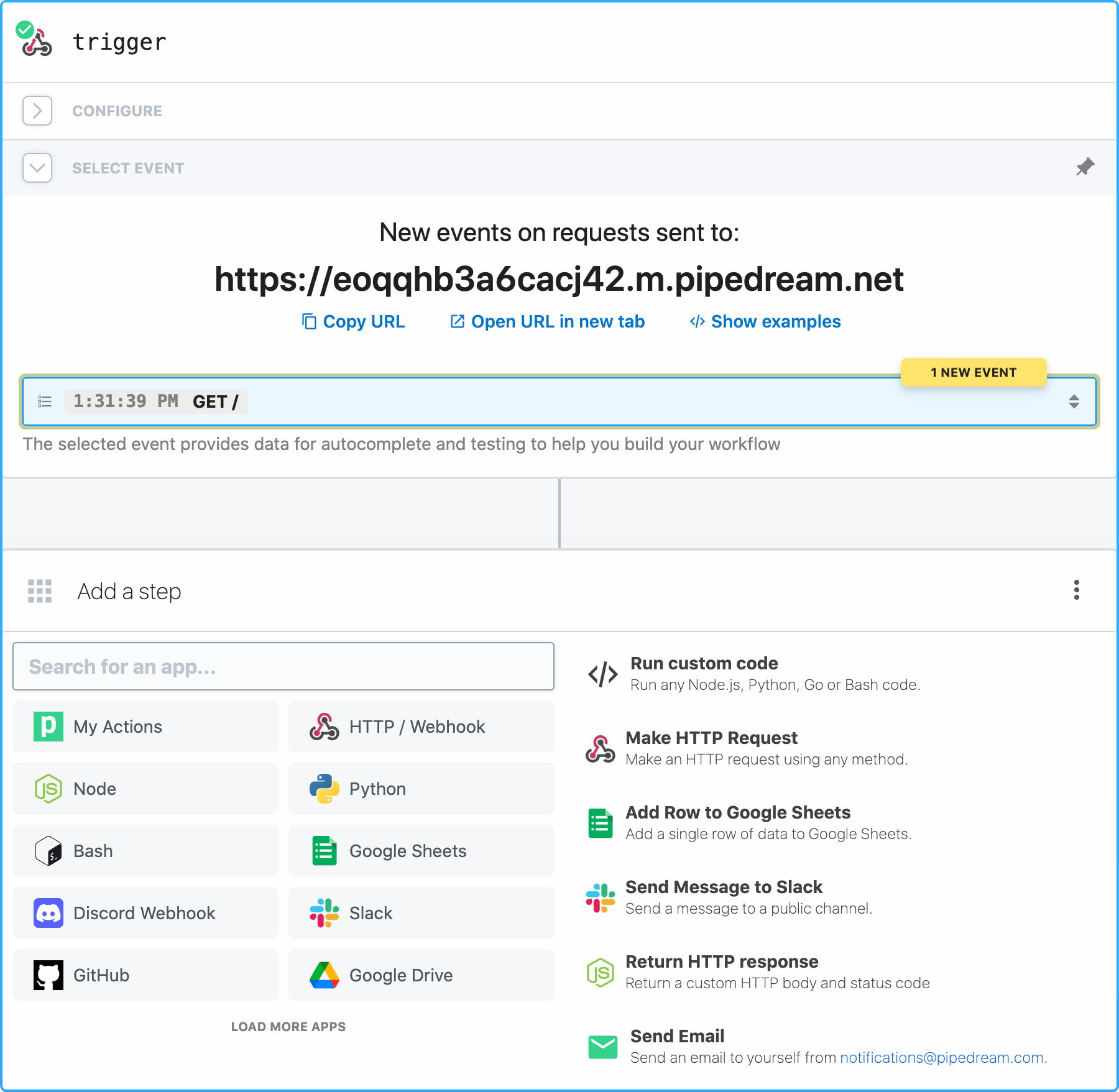
<img src="https://raw.githubusercontent.com/PipedreamHQ/pipedream/master/images/hero2.png" width="800px" alt="HTTP trigger + step selection menu" >
<br />
</p>
This repo contains:
- The code for all pre-built integration components
- The product roadmap
- The Pipedream docs
- And other source code related to Pipedream.
This README explains the key features of the platform and how to get started.
To get support, please visit https://pipedream.com/support.
Key Features
- Workflows - Workflows run automations. Workflows are sequences of steps - pre-built actions or custom Node.js, Python, Golang, or Bash code - triggered by an event (HTTP request, timer, when a new row is added to a Google Sheets, and more).
- Event Sources - Sources trigger workflows. They emit events from services like GitHub, Slack, Airtable, RSS and more. When you want to run a workflow when an event happens in any third-party app, you're using an event source.
- Actions - Actions are pre-built code steps that you can use in a workflow to perform common operations across Pipedream's 1,000+ API integrations. For example, you can use actions to send email, add a row to a Google Sheet, and more.
- Custom code - Most integrations require custom logic. Code is often the best way to express that logic, so Pipedream allows you to run any Node.js, Python, Golang, or Bash code. You can import any package from the languages' package managers, connect to any Pipedream connected app, and more. Pipedream is "low-code" in the best way: you can use pre-built components when you're performing common actions, but you can write custom code when you need to.
- Destinations - Deliver events asynchronously to common destinations like Amazon S3, Snowflake, HTTP and email.
- Free - No fees for individual developers (see limits)
Demo
Click the image below to watch a brief demo on YouTube.
<p align="center">
<br />
<a href="https://bit.ly/3ytGgyR">
<img src="https://raw.githubusercontent.com/PipedreamHQ/pipedream/master/images/demo.png" width="800px" alt="Pipedream demo static image" />
</a>
</p>
Workflows
Workflows are sequences of linear steps triggered by an event (like an HTTP request, or when a new row is added to a Google sheet). You can quickly develop complex automations using workflows and connect to any of our 1,000+ integrated apps.
See our workflow quickstart to get started.
Event Sources
Event Sources watch for new data from services like GitHub, Slack, Airtable, RSS and more. When a source finds a new event, it emits it, triggering any linked workflows.
You can also consume events emitted by sources using Pipedream's REST API or a private, real-time SSE stream.
When a pre-built source doesn't exist for your use case, you can build your own. Here is the simplest event source: it exposes an HTTP endpoint you can send any request to, and prints the contents of the request when invoked:
export default {
  name: "http",
  version: "0.0.1",
  props: {
    http: "$.interface.http",
  },
  run(event) {
    console.log(event); // event contains the method, payload, etc.
  },
};
<a href="https://pipedream.com/sources/new?app=http"><img src="https://i.ibb.co/m0bBsSL/deploy-clean.png" height="35"></a>
You can find the code for all pre-built sources in the components directory. If you find a bug or want to contribute a feature, see our contribution guide.
Actions
Actions are pre-built code steps that you can use in a workflow to perform common operations across Pipedream's 500+ API integrations. For example, you can use actions to send email, add a row to a Google Sheet, and more.
You can create your own actions, which you can re-use across workflows. You can also publish actions to the entire Pipedream community, making them available for anyone to use.
Here's an action that accepts a name as input and prints it to the workflow's logs:
export default {
  name: "Action Demo",
  description: "This is a demo action",
  key: "action_demo",
  version: "0.0.1",
  type: "action",
  props: {
    name: {
      type: "string",
      label: "Name",
    },
  },
  async run() {
    return `hello ${this.name}!`;
  },
};
You can find the code for all pre-built actions in the components directory. If you find a bug or want to contribute a feature, see our contribution guide.
Custom code
Most integrations require custom logic. Code is often the best way to express that logic, so Pipedream allows you to run custom code in a workflow using:
<table align="center">
<tr>
<td>
<a href="https://pipedream.com/docs/code/nodejs/">
<img alt="Node.js" src="https://raw.githubusercontent.com/PipedreamHQ/pipedream/master/images/languages/nodejs.svg" width="100">
</a>
</td>
<td>
<a href="https://pipedream.com/docs/code/python/">
<img alt="Python" src="https://raw.githubusercontent.com/PipedreamHQ/pipedream/master/images/languages/python.svg" width="100">
</a>
</td>
</tr>
</tr>
<td>
<a href="https://pipedream.com/docs/code/go/">
<img alt="Go" src="https://raw.githubusercontent.com/PipedreamHQ/pipedream/master/images/languages/go.svg" width="100">
</a>
</td>
<td>
<a href="https://pipedream.com/docs/code/bash/">
<img alt="Bash" src="https://raw.githubusercontent.com/PipedreamHQ/pipedream/master/images/languages/bash.svg" width="100">
</a>
</td>
</tr>
</table>
You can import any package from the languages' package managers by declaring the imports directly in code. Pipedream will parse and download the necessary dependencies.