Constrained peek so you can sanity-check the source material without leaving the site.
<p align="center">
<h1 align="center"><img vertical-align="middle" width="400px" src="https://raw.githubusercontent.com/Tencent/AI-Infra-Guard/main/img/logo-full-new.png" alt="A.I.G"/></h1>
</p>
<p align="center">
<a href="https://tencent.github.io/AI-Infra-Guard/">📖 Documentation</a> |
🌐 <a href="./readme/README_ZH.md">🇨🇳 中文</a> · <a href="./readme/README_JA.md">🇯🇵 日本語</a> · <a href="./readme/README_ES.md">🇪🇸 Español</a> · <a href="./readme/README_DE.md">🇩🇪 Deutsch</a> · <a href="./readme/README_FR.md">🇫🇷 Français</a> · <a href="./readme/README_KR.md">🇰🇷 한국어</a> · <a href="./readme/README_PT.md">🇧🇷 Português</a> · <a href="./readme/README_RU.md">🇷🇺 Русский</a>
</p>
<p align="center">
<a href="https://github.com/tencent/AI-Infra-Guard/stargazers">
</a>
<a href="https://github.com/Tencent/AI-Infra-Guard">
</a>
<a href="https://github.com/Tencent/AI-Infra-Guard">
</a>
<a href="https://github.com/Tencent/AI-Infra-Guard">
</a>
<a href="https://deepwiki.com/Tencent/AI-Infra-Guard">
<img src="https://deepwiki.com/badge.svg" alt="Ask DeepWiki">
</a>
</p>
<p align="center">
<a href="https://clawhub.ai/aigsec/edgeone-clawscan" target="_blank">
</a>
<a href="https://clawhub.ai/aigsec/edgeone-skill-scanner" target="_blank">
</a>
<a href="https://clawhub.ai/aigsec/aig-scanner" target="_blank">
</a>
</p>
<p align="center">
<a href="https://github.com/openclaw/clawscan" target="_blank">
</a>
</p>
<p align="center">
<a href="https://trendshift.io/repositories/13637" target="_blank"><picture><source media="(prefers-color-scheme: dark)" srcset="https://trendshift.io/api/badge/repositories/13637"><source media="(prefers-color-scheme: light)" srcset="https://trendshift.io/api/badge/repositories/13637"><img src="https://trendshift.io/api/badge/repositories/13637" alt="Tencent%2FAI-Infra-Guard | Trendshift" width="250" height="55"/></picture></a>
<a href="https://www.blackhat.com/eu-25/arsenal/schedule/index.html#aigai-infra-guard-48381" target="_blank"><img src="https://raw.githubusercontent.com/Tencent/AI-Infra-Guard/main/img/blackhat.png" alt="Tencent%2FAI-Infra-Guard | blackhat" width="175" height="55"/></a>
<a href="https://github.com/deepseek-ai/awesome-deepseek-integration" target="_blank"><img src="https://raw.githubusercontent.com/Tencent/AI-Infra-Guard/main/img/awesome-deepseek.png" alt="Tencent%2FAI-Infra-Guard | awesome-deepseek-integration" width="273" height="55"/></a>
</p>
<br>
<p align="center">
<h2 align="center">🚀 AI Red Teaming Platform by Tencent Zhuque Lab</h2>
</p>
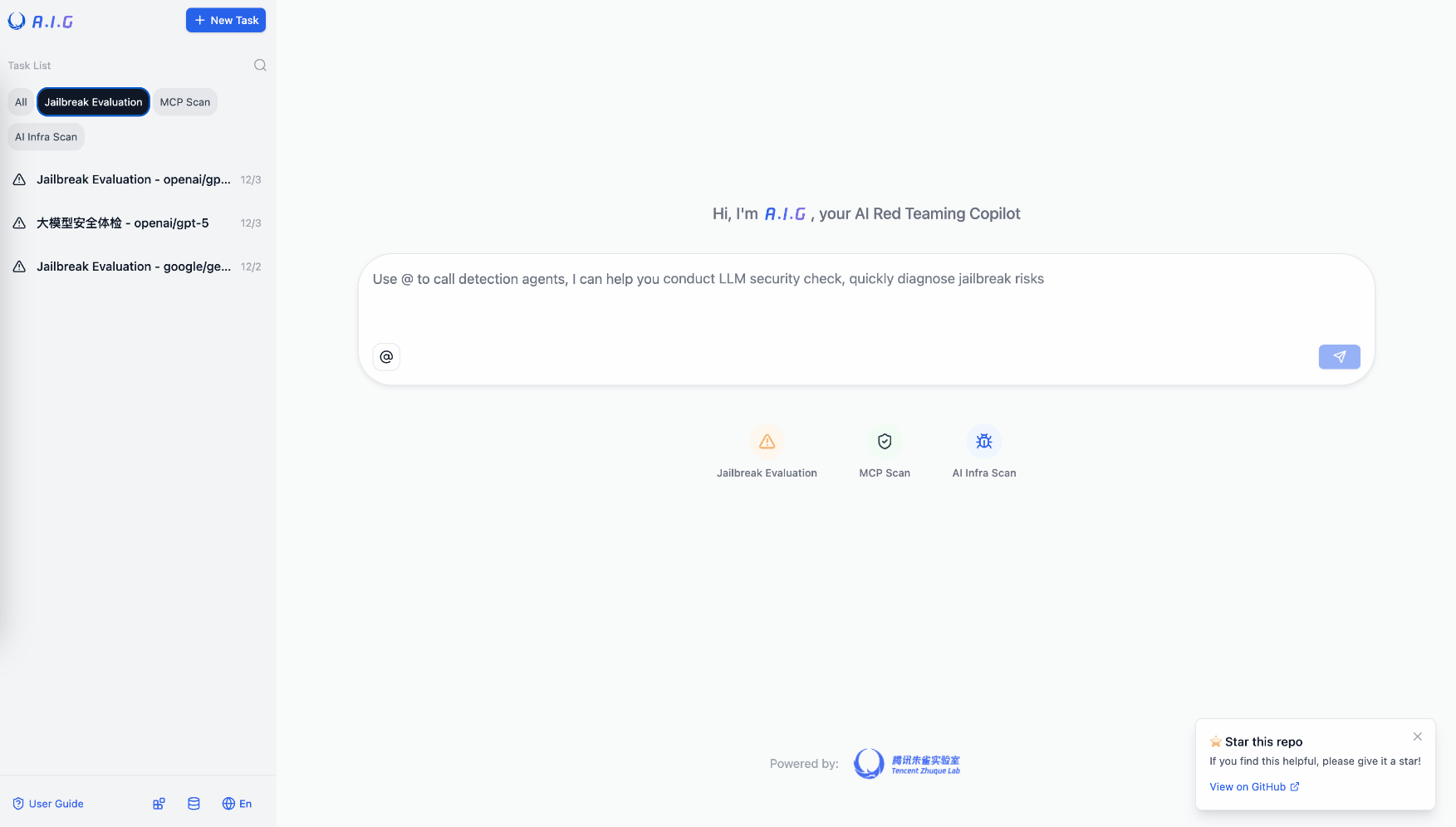
<b>A.I.G (AI-Infra-Guard)</b> integrates capabilities such as ClawScan(OpenClaw Security Scan), Agent Scan,AI infra vulnerability scan, MCP Server & Agent Skills scan, and Jailbreak Evaluation, aiming to provide users with the most comprehensive, intelligent, and user-friendly solution for AI security risk self-examination.
<p>
We are committed to making A.I.G(AI-Infra-Guard) the industry-leading AI red teaming platform. More stars help this project reach a wider audience, attracting more developers to contribute, which accelerates iteration and improvement. Your star is crucial to us!
</p>
<p align="center">
<a href="https://github.com/Tencent/AI-Infra-Guard">
</a>
</p>
<br>
📋 User Feedback Survey
Help us improve A.I.G! Please take 3-5 minutes to fill out our User Feedback Survey. Users who provide high-quality feedback and leave a valid email address will receive an exclusive Tencent souvenir gift.
<br>
🚀 What's New
- 2026-09-17 · v4.6.2 — Vuln library expanded with 155 new CVE rules across 40+ AI components (LangFlow, n8n, PraisonAI, vLLM, llama-cpp, MLflow & more); Skill-Scan accuracy improvements (fewer evidence-free false positives, stall-free streaming); new agent loss-of-control benchmarks (FORGE-Bench, RogueHandoff-20).
- 2026-09-10 · v4.6.1 — API Checker: expanded model fingerprint coverage (Gemini 2.5/3.1, Gemma 2/3/4, GLM-5.3 & GLM-5.3-Flash); MCP-Scan reliability: flags empty/incomplete scans, preserves security findings during context compaction, surfaces underlying connection errors; corrected mislabeled CVE product names.
- 2026-08-26 · v4.6.0 — LLM API poisoning detection (multi-probe black-box audit for model substitution & backdoor risks); Agent-Scan v5.0.0 mutation engine refactor; vuln library expanded to 146 AI components & 2000+ CVE rules; MCP/Skill scan stability & compatibility fixes.
- 2026-08-17 · v4.5.2 — Skill-Scan: .pyc bytecode bypass detection + charset smuggling defense; MCP-Scan: RCE prevention via tool whitelisting in dynamic mode; new SkillJack research project; vuln library expanded to 2000+ CVE rules.
- 2026-07-30 · v4.5.1 — Jailbreak Evaluation: 4 multi-turn jailbreak attacks (Many-Shot, PAIR, GOAT, ActorAttack); Agent-Scan: 5 new OWASP skills + web-exfiltration detection (10 skills total); MCP-Scan: 4 new security rules
👉 Earlier releases · 🛒 AI Security Skill Market · 🔍 skill-scan CLI · 🔍 mcp-scan CLI · 🔍 agent-scan CLI · 📊 SkillTrustBench
Table of Contents
- 🚀 Quick Start
- ✨ Features
- 🖼️ Showcase
- 📖 User Guide
- 🔧 API Documentation
- 🏗️ Architecture Evolution
- 📝 Contribution Guide
- 🛡️ About the Team
- 🙏 Acknowledgements
- 💬 Join the Community
- 📖 Citation
- 📚 Research & Papers
- ⚖️ License & Attribution
<br><br>
🚀 Quick Start
🐳 Deploy A.I.G with Docker
| Docker | RAM | Disk Space |
|---|
| 20.10 or higher | 4GB+ | 10GB+ |
# This method pulls pre-built images from Docker Hub for a faster start
git clone https://github.com/Tencent/AI-Infra-Guard.git
cd AI-Infra-Guard
# For Docker Compose V2+, replace 'docker-compose' with 'docker compose'
docker-compose -f docker-compose.images.yml up -d
Once the service is running, you can access the A.I.G web interface at:
http://localhost:8088
<br>
Use from OpenClaw
You can also call A.I.G directly from OpenClaw chat via the aig-scanner skill.
clawhub install aig-scanner
Then configure AIG_BASE_URL to point to your running A.I.G service.
For more details, see the aig-scanner README.
<details>
<summary><strong>More installation options</strong></summary>
Other Installation Methods
Method 2: One-Click Install Script (Recommended)
# This method will automatically install Docker and launch A.I.G with one command
curl https://raw.githubusercontent.com/Tencent/AI-Infra-Guard/refs/heads/main/docker.sh | bash
Method 3: Build and run from source
git clone https://github.com/Tencent/AI-Infra-Guard.git
cd AI-Infra-Guard
# This method builds a Docker image from local source code and starts the service
# (For Docker Compose V2+, replace 'docker-compose' with 'docker compose')
docker-compose up -d
Note: The AI-Infra-Guard project is positioned as an AI red teaming platform for internal use by enterprises or individuals. It currently lacks an authentication mechanism and should not be deployed on public networks.